
Graduation season is one of the busiest times of the year for the parents of seniors. They soak up the moments of the last of the sporting events, the hustle and bustle of prom, and plan to celebrate the graduation ceremony of their graduate with an open house. How will they share the details of their grad party? Word of mouth and with grad cards of course!
In our last blog, Top Tips for Offering Grad Cards, Maureen Miller, CPP, shared ideas on how to incorporate offering grad cards into your senior packages. By offering grad cards, whether as an incentive or as a package a la carte product, you get to monitor the quality control of the final product. When you print your cards at McKenna, you ensure your work is printed on the highest quality papers showcasing great color and detail every time.
But, what about the design? Designing senior grad cards shouldn’t feel like a chore. We have options to help you streamline your process so you can spend less time designing at your desk and more time out photographing! Whether you’re looking for quick and easy templates or prefer full creative control, here are a few tips to make designing your grad cards a breeze every season.

Keep It Simple With Our Drag-and-Drop Templates
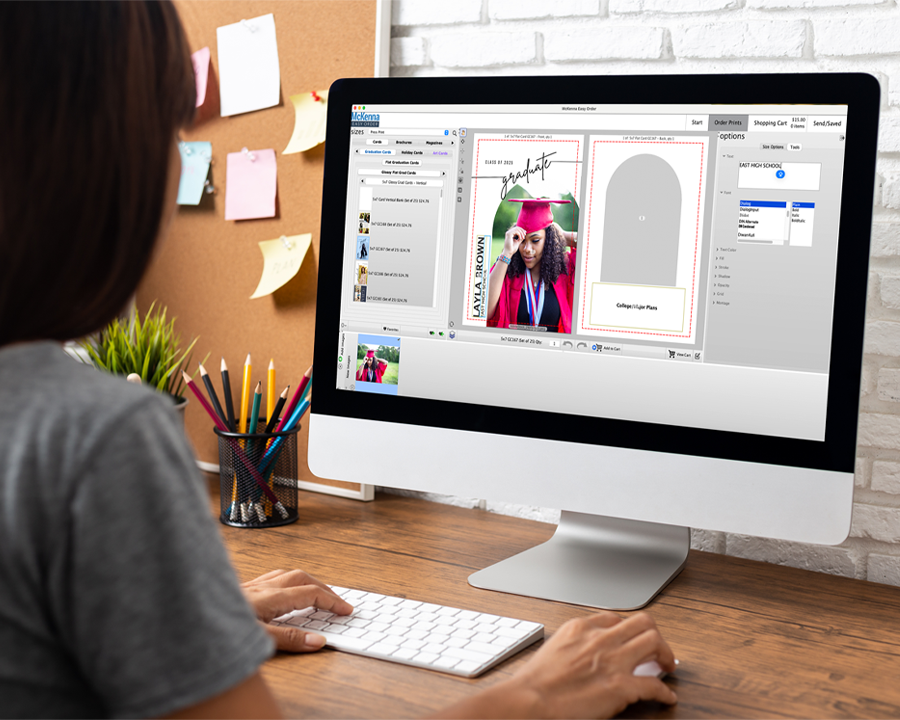
We offer several drag-and-drop grad card templates for you to choose from. We update these designs every spring to bring new and fresh looks to our offering lineup. Using these templates in Easy Order and McKenna Web is easy:
- Upload your images.
- Choose your template.
- Drag your images into the image nodes.
- Update the text nodes with your clients’ information.
- Add to the cart and submit your order.
McKenna Tip: When using the templates in Easy Order and McKenna Web, the more you type in the text nodes, the smaller your text will be.

I Love Your Templates, but I Need A Little More Customization!
We make the customization of our grad card templates easier by offering downloadable Photoshop files of the designs. You can find our past and current PSDs, as well as the Grad Card Marketing Brochure PDFs, from our Downloads page. These PSDs give you a springboard for your creativity with the ability to change colors, fonts, sizes, add more image nodes, etc.

I Have A Senior Grad Card Design In Mind. Where Do I Start?
Ensure your one-of-a-kind grad card design is set up correctly by downloading our Base Template PSD’s before you start designing. Why do we recommend doing this? These PSD files include the bleed that is needed for printing which is 1/8” on each side of the cards. (For example: a 5×7 printed card needs a 5.25 x 7.25 file size.) We also include a safe line as a reference of where to keep all of your important text and design elements for printing.
McKenna Tip: Keeping your text and design elements within the safe area of the design, and not right up against the line, is important as all cards are stack cut during the finishing process.

What Details Should Be On My Grad Card Design?
The most common details included on a grad card are the graduate’s name, graduation year, and the date, time, and location of the party. Other details may include:
- Name of the high school they are graduating from
- Commencement ceremony details
- Honors or achievements
- Favorite quote or motivational message
- Future plans such as where they are attending a trade school or college, their field of study, joining the military or the workforce, etc.
- Other details of the party such as menu, gifts, registries, etc.
Need More Inspiration?
There are thousands of graduation templates out there to spark your creativity and match your seniors’ unique style. Google and Pinterest are great resources for looking for the current grad card trends. You can find additional pre-templates and design elements for purchase through Adobe Stock, Etsy, Canva, and Creative Market.
Three popular design trends for graduation announcements that we see photographers using include:
- A minimalist aesthetic with clean lines, white space, and focus on the imagery.
- Bold typography for the grad’s name and mixing script fonts for the header text with serif or san serif fonts for the detailed copy.
- Geometric shapes used as the image nodes or in a pattern within the design.
Happy Designing!
Once your design is complete, save your JPG files, select your favorite McKenna paper type and finish, and place your McKenna card order. The 2025 graduation season will be here and over before you know it, so don’t delay placing your orders! Cards are printed and shipped within 1-2 business days of receiving your order.